Set up Moto 5G
About Moto 5G hardware
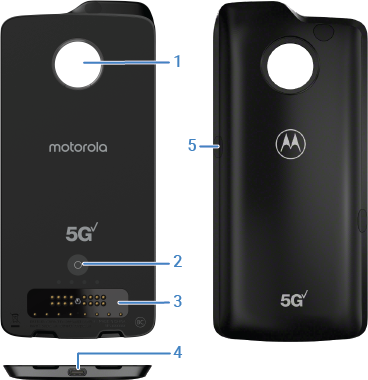
Attach and detach
Attach or detach the Moto 5G anytime without disrupting voice calls or apps you are using.
- Remove your phone case if you use one.
- Make sure the connector block is clean and dry.
Align the sides of your phone with the sides of the Moto 5G until they snap together.
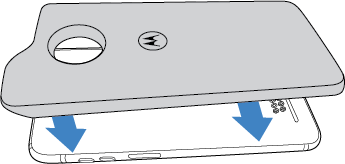
When the Moto 5G connects to the phone, you feel a vibration, and hear a sound. Allow up to 30 seconds for Moto 5G to turn on and access a data network. Your Moto 5G automatically connects to the 5G data network where coverage is available.
The Time and Weather widget also confirms that the Moto 5G is attached and displays its status while it starts and connects with a network.
Lift the bottom notches to detach the Moto 5G from your phone. Do not press on the camera to detach the Moto 5G.
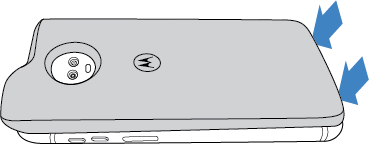
After the Moto 5G is detached, it goes to sleep mode, then after awhile turns off.
Charge
Use the TurboPower charger provided with your phone to charge your Moto 5G. Don’t use other chargers with a USB-C connector, which can slow charge speed, and avoid incompatible USB-B (micro USB) chargers and uncertified adapters and cables.
To charge the Moto 5G, connect your TurboPower charger directly to your Moto 5G. When attached to a phone, connecting the TurboPower charger to either device simultaneously charges the phone and Moto 5G.
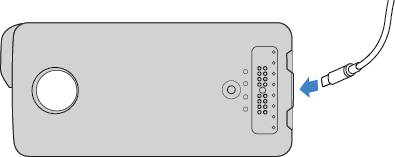
To check charge level, do one of the folllowing:
- Briefly press the battery check button to check the charge level. The more LEDs that are on, the higher the charge level. Holding this button restarts the Moto G5.
- When the Moto 5G is attached, view the Moto Mod notification or the Moto Mod quick settings tile to check the battery charge level.
The Moto 5G disconnects from the network when the battery becomes empty.