Use Moto 5G
Check data connection status
When your Moto 5G is attached, the phone automatically switches between 4G and 5G data depending on the fastest data network available.
To check the data connection status, do any of the following:
View the data network icon in the status bar:

Using 5G network 
Using Wi-Fi (5G is available). The phone uses Wi-Fi, when available, instead of mobile data unless you manually disconnect the Wi-Fi connection or turn off Wi-Fi. 
Using 4G network (5G not available) - Swipe down with two fingers to fully open quick settings, then view the Mobile data icon
 for the type of data connection in use. Tap icon to toggle mobile data off and on for both your phone and Moto 5G. Touch and hold icon to view mobile data usage.
 - On Android 9 or later, the bottom of the quick settings curtain shows the data connection type, network signal strength and carrier.
View data usage
Your phone and Moto 5G have separate data plans. When the Moto 5G is attached, the phone uses only the Moto 5G’s data plan, not the phone’s data plan.
- Attach Moto 5G.
Go to Settings > Network & internet > Data usage.
Moto Mod data usage is data used only by your Moto 5G in the current billing cycle.
Mobile data usage is data used only by your phone in the current billing cycle.
Share 5G connection with multiple devices
Share your 5G connection with one or more devices connected to your Wi-Fi hotspot.
Moto 5G can use your existing hotspot settings.
- Connect Moto 5G to phone.
- On phone, go to Settings > Network & internet > Hotspot & tethering.
- Turn on Portable Wi‑Fi hotspot.
If a device cannot connect to your hotspot, try changing the AP Band from 5.0 GHz Band to 2.4 GHz Band:
- Go to Settings > Network & internet > Hotspot & tethering.
- Touch Portable Wi‑Fi hotspot > Advanced > AP Band.
- Select 2.4 GHz Band, then touch Apply.
Share 5G connection with a tethered device
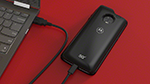
Share your 5G connection with a laptop or other device connected with a USB cable. A tethered connection (5 Gbps) is faster than a Wi-Fi hotspot.
- Connect Moto 5G to phone.
Connect USB-C cable from device to Moto 5G.
- On phone, go to Settings > Network & internet > Hotspot & tethering.
Turn on USB tethering.
If you don’t see this option, attach Moto 5G to phone, then connect USB-C cable to Moto 5G.