Controls and status lights
Controls
Wherever you go, the contoured collar design is made to fit your body, so it hardly feels like you’re wearing them at all
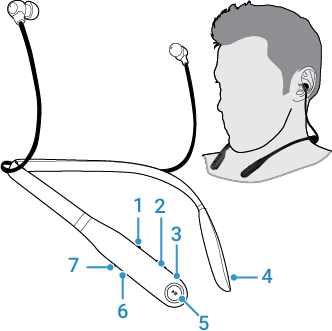
 to increase volume. Press and hold
  for next track.
 to decrease volume. Press and hold
  for previous track.
 to answer or end call. Buttons at end of collar are magnets for securing the earbuds when not in use so they stay in place and avoid tangling. Keep these magnets away from magnetic information, such as credit card strips and ID cards.
 to play or pause music.
 to power on or off. Press quickly to hear the charge level.
Status light
| Status | Light |
|---|---|
| Pairing mode | Blinking blue |
| Connected | Steady blue |
| Battery low | Blinking red |
| Battery charging | Steady red |
| Battery fully charged | Steady green |
| Charge level check | Steady green for two seconds |
| Power off | Fading in/out blue |