Charge and check charge level
Charge and power on
Before use, connect the USB cable to a wall charger (not included) or computer, then charge until the status light turns green.
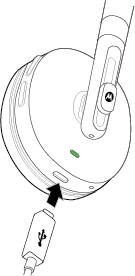
Press the Power button to power on.

NoteYour battery is designed to last the life of the product. It should only be removed by a recycling facility. Any attempt to remove or replace your battery may damage the product and void your warranty.
Check charge level
While disconnected from a charger, press  and
and  together to check charge level.
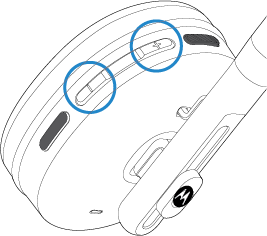
The status light color indicates the approximate charge remaining:
- Red: 0-19%
- Yellow: 20-70%
- Green: 71-100%
Use the Connect app to view the precentage of charge remaining.