About your hardware
Hardware diagram
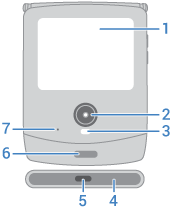
- External display - Swipe up to unlock, down for quick settings, left/right for notification details. Answer incoming calls or send a quick reply. You can change the wallpaper. For an overview, open the Moto app and touch

- Camera (learn more in Camera help)
- LED flash
- Speaker
- USB-C port to charge phone, transfer files, share data connection with tethered devices, and use wired headphones
- Fingerprint sensor
- Microphone
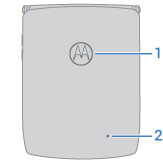
- NFC touchpoint for sharing content or paying with your phone
- Microphone
CautionThe back cover is non-removable. Your phone doesn't have any removable cards (SIM or SD), so there's nothing to insert or remove.
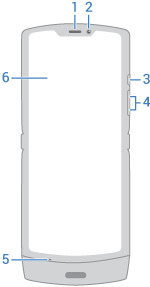
- Earpiece
- Selfie camera
- Power button
- Volume up/down button
- Microphone
- Internal display
Care for your phone
Take care not to physically damage your phone. Don't puncture or apply excessive force to the main screen with a hard or sharp object while carrying your phone. Before closing the phone, always ensure that there are no obstructions between the screens or hinges. Items such as cards, coins, keys, and other objects can damage your screen or prevent your phone hinge from closing properly. Don't use excessive force to press the middle area of the screen. Avoid exposing your phone to water, coffee, or other liquids. Also, don't expose your phone to tiny pieces of debris, such as grit.
To clean the screen:
- While this does not disinfect your phone, the best way to keep your phone clean is to wipe it thoroughly with a dry soft cloth. Avoid abrasive cloths, including paper towels and other materials with rough surfaces.
- If the screen gets drops of liquid on it, wipe it with a clean, dry cloth.
To disinfect your phone:
- It is okay to use wipes or cloths moistened with 70% isopropyl alcohol or Clorox® Disinfecting Wipes to gently wipe your screen.
- When disinfecting or cleaning your phone, turn it off and avoid getting any moisture in its openings, including the charging port, headphone jack, microphones and speakers.
- Don't submerge your phone in any cleaning agents, avoid using any cleaners with bleach or abrasives, and avoid spraying cleaners directly on the screen.
Other tips:
- Your phone uses an eSIM, so there’s no physical SIM to insert.
- Don't submerge your phone in water or other liquids. When you're near water, consider using a Bluetooth speaker to listen music from your phone while keeping it safe.
- Hold your phone firmly when using gestures to open the camera or turn the flashlight on/off.