Use quick settings
Open quick settings
Settings you adjust frequently, like Bluetooth, are “quick settings”, easy to get to from any screen.
To see your first few quick settings, swipe down once from the top of the screen. This works both when the phone is closed (on the external display) and when the phone is open (on the home screen).
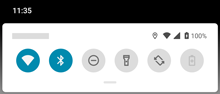
If the phone is open, swipe down again to see all quick settings. (If the phone is closed, the external display only includes the first six settings and you can't swipe again for more.)
Adjust quick settings
To adjust screen brightness, slide 
To adjust other settings:
- Tap an icon to toggle the setting on


- Touch & hold an icon to adjust related settings.
| Icon | Setting |
|---|---|
 | Wi-Fi |
 | Bluetooth |
 | Do Not Disturb |
 | Auto-rotate |
 | System update |
 | Audio effects (You can add this to quick settings.) |
 | Flashlight |
 | Airplane mode |
 | Wi-Fi hotspot (Appears after you turn on hotspot the first time.) |
 | Quick Share |
 | Battery saver |
 | Mobile data |
 | Screen Cast |
 | Screen Record |
 | Data Saver (Appears after you turn on Data Saver the first time.) |
 | Night Light |
 | Bedtime mode (Appears after you turn on Bedtime mode the first time.) |
 | Color inversion (Appears after you turn on Color inversion the first time.) |
Open all settings
To open the full list of all settings:
- Open quick settings and tap

- Or, open the Settings app


Customize quick settings
Add, remove, rearrange quick settings
You can rearrange quick settings, putting your most used at the top. You can also add or remove them.
- Open quick settings.
- Tap

-
Drag to add, remove, or rearrange.
TipIf you’re rearranging, know that only the first six settings show on the external display.
To return quick settings to its original state, tap 