Status bar icons
About status icons
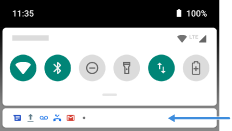
The status bar at the top of the home screen contains icons that help you monitor your phone.
- On the left, icons tell you about apps, such as new messages or downloads. If you don't know what one of these icons means, swipe the status bar down for details.
- On the right, icons tell you about your phone's battery level and network connections.
A dot means there are more icons to view. Drag down from the top of the screen to see all icons.

What status icons mean
These are the icons from apps that came on your phone and the phone status icons.
| CALLS | |
 | Active call. |
 | Missed call. |
 | Speakerphone on. |
 | Microphone muted. |
| NETWORK | |
 | Connected to cellular/mobile network (full signal). Speed of your network connection is also shown. Possible speeds, from slowest to fastest, are 3G, H, H+, 4G, 5G. Available speeds depend on your carrier and your location. |
 | Poor connection to cellular/mobile network. |
 | Connected to different cellular/mobile network (roaming). |
 | Data Saver is on, preventing apps from using background data. |
 | Wi‑Fi network within range. |
 | Connected to Wi‑Fi network. |
 | Poor connection to Wi‑Fi network. |
 | No SIM card. |
 | Location services are in use. |
 | Airplane mode on. |
| CONNECTIVITY | |
 | Bluetooth on. |
 | Trusted device connected. |
 | Your phone is a Wi‑Fi hotspot. Devices can connect to share your data connection. |
 | Wireless display or adaptor connected. |
 | Connected by USB cable. |
 | USB tethering enabled. |
| SYNC AND UPDATES | |
 | App updates are available for download from Play Store. |
 | App successfully installed from Play Store. |
 | Email and calendar sync in progress. |
 | Upload complete. |
 | Download complete. |
 | Google backup in progress. |
 | Google backup complete. |
| SOUND | |
 | Vibrate. |
| DO NOT DISTURB | |
 | Do Not Disturb is on. |
| BATTERY | |
 | Battery fully charged. |
 | Battery charging. |
 | Battery low. |
 | Phone is in Battery Saver mode. |
| ALARM AND CALENDAR | |
 | Alarm set. |
 | Upcoming calendar event. |
| EMAIL AND MESSAGING | |
 | New Gmail message. |
 | New text message. |
 | New voicemail. |
 | Important alert. |
| OTHER ICONS | |
 | Screenshot is available. |
 | Focus mode is on. |
Apps that you download might show other icons to alert you about their status.
Certain features, services, and applications are network or carrier dependent and may not be available in all areas.