Take 360° photos and videos
For the best image quality, use a soft, clean cloth to keep the lenses free from dust and smudges.
Capture 360° photo
- Turn on 360 Camera.
Hold in portrait for the ideal Moto 360 Camera experience.

To capture photo, do any of the following:
- Touch
 on screen.
 Press button on back of 360 Camera.
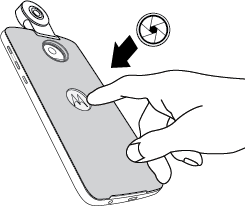
- Press volume key on side of phone.
- Touch
- Touch
 to set number of seconds before camera captures photo.
 - Swipe viewfinder left to view or edit photo.
Record 360° video
- Turn on 360 Camera.
Hold in portrait for the ideal Moto 360 Camera experience.
- Touch
 to use video mode.
 To start recording, do any of the following:
- Touch
 on viewfinder.
 - Press button on back of 360 Camera.
- Press volume key on side of phone.
The red light on top of the lens indicates that the 360 Camera is recording.
The screen dims after one minute of recording. To brighten the screen, touch it.
- Touch
- To pause recording, touch
 .
. To stop recording, do any of the following:
- Touch
 on viewfinder.
 - Press button on back of 360 Camera.
- Press volume up key on side of phone.
- Touch
- Swipe viewfinder left to view or edit video.
Your phone may become warm while working with 360° videos and photos, which require more processing power than most tasks. This behavior is normal. The 360 Camera will automatically stop if the phone temperature becomes too high.