Hardware
Attach camera
- Make sure the connectors are clean and dry. Also, remove any Mods or cases covering the back of your phone.
Align camera lens on back of phone with 360 Camera, and then align sides and bottom of phone with 360 Camera until they snap together.
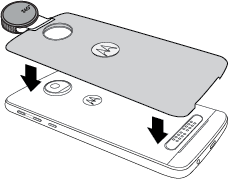
To remove lens cover, lift up and twist off.

CautionTo prevent lens scratches, always keep the lens cover on while not using your camera. Do not lay your camera on a flat surface unless the lens cover is on.
Turn on camera
Do any of the following:
Twist your wrist twice to open the 360 Camera. (Two more twists switches to the phone camera.)

- Press and hold button on back of 360 Camera.
- Swipe
 up from bottom corner of lock screen.
 - Touch
 on home screen.
You never need to turn off your 360 Camera, which has no battery.
To switch between the 360 Camera and phone camera, do any of the following:
- Touch
 on viewfinder screen.
 - Twist wrist twice to switch between cameras.
Detach camera
- Rotate phone so the 360 Camera is on top and the screen faces away from you.
Lift notch to pull 360 Camera from phone.
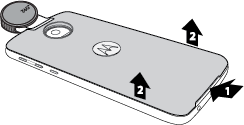 CautionWhen removing 360 Camera, do not grip the lens, which would damage it.