Find your phone
Turn on Find your phone
Turn on the Find your phone feature if you'd like to use your Keylink to find your phone. Turning on this feature will cause a small increase in battery usage.
- Open the Connect
 app.
app. - Touch the card for your Keylink device.
- Turn on Find your phone.
- For best results, set the phone ringer volume to loud and check that your phone is not in silent mode.
 app.
app.Find your phone
Quickly press the Keylink power button twice to ring your lost phone.
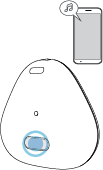
The Keylink status light flashes and your phone rings.
To stop the phone from ringing, press the Keylink power button or touch your phone's screen.
NoteKeylink can maintain a Bluetooth connection with your phone up to a distance of about 100 feet.