View notifications
Find your notifications
Apps send notifications to alert you about things such as new messages, calendar events and alarms.
You see notifications:
- On your lock screen
When you swipe the status bar down on any screen
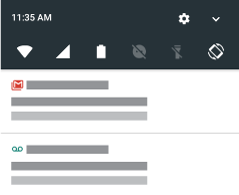
If you receive multiple notifications from an app, they're bundled together. Swipe down to view more details.
Some important notifications pop up briefly over your current app so that you can take action. For example, a notification for an incoming call might appear while you're watching a video, so that you can answer or dismiss the call.
What you can do with notifications
- Respond from a notification. Many notifications include actions at the bottom that let you complete common tasks without opening the full app. If you have several notifications, these actions are hidden. When you see
 , touch it to reveal actions.
 - Open the app that sent the notification Swipe down from the top of the screen and touch the notification to open the app. From your lock screen, touch the notification twice and enter your PIN, pattern or password to unlock your screen and open the app.
- Dismiss a notification. Swipe it sideways.
- Clear all notifications. Swipe to the end of your notifications and touch CLEAR ALL. Some notifications, like voicemails, require an action and cannot be dismissed.
Customise your notifications
Use Do not disturb to silence all notifications when you don't want interruptions.
You can also customise notifications, controlling the notification sound, which apps send notifications and how notifications show on your lock screen.