About your hardware
Hardware diagram
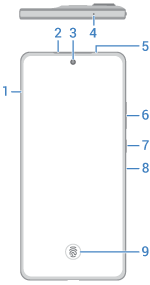
- Tray for SIM and SD cards
- Earpiece/speaker
- Front camera (learn more in Camera help)
- Microphone
- Proximity and ambient light sensors
- Volume up/down buttons
- Power button
- Air vent. If using a protective case, ensure it does not obstruct the air vent hole to avoid noise during calls or media playback.
- Fingerprint sensor
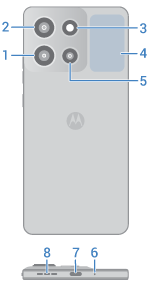
- Ultrawide, macro camera
- Main camera
- Flash
- NFC sensor area for scanning tags or paying with your phone (Only some versions of this phone, sold in certain countries, support this feature.)
- Light sensor
- Microphone
- USB-C port to charge phone, transfer files, share data connection with tethered devices, and use wired headphones
- Speaker
Protect your phone
Find cases and other accessories designed for your phone at motorola.com
Care for your phone
To clean the screen:
- While this does not disinfect your phone, the best way to keep your phone clean is to wipe it thoroughly with a dry soft cloth. Avoid abrasive cloths, including paper towels and other materials with rough surfaces.
- If the screen gets drops of liquid on it, wipe it with a clean, dry cloth.
To disinfect your phone:
- It is okay to use wipes or cloths moistened with 70% isopropyl alcohol or Clorox® Disinfecting Wipes to gently wipe your screen.
- When disinfecting or cleaning your phone, turn it off and avoid getting any moisture in its openings, including the charging port, headphone jack, microphones and speakers.
- Don't submerge your phone in any cleaning agents, avoid using any cleaners with bleach or abrasives, and avoid spraying cleaners directly on the screen.
Dust and water resistance
Tested under controlled laboratory conditions, the phone is water, splash, and dust resistant to ratings of IP68 and IP69 (IEC 60529). The phone can be submerged up to 1.5 meters in still, fresh water for up to 30 minutes, and is protected against powerful, high-temperature water jets for up to 30 seconds. Exposure to conditions beyond these ratings is not covered by warranty. Resistance will decrease as a result of normal wear. Not designed to work while submerged underwater. Do not expose to liquids other than fresh water. Do not attempt to charge a wet phone. Designed to provide protection against the ingress of solid foreign objects of any size. Not waterproof.
To prevent water damage to your phone:
- Do not expose your phone salt water or liquids other than fresh water
- Avoid prolonged exposure to water, and do not intentionally submerge in water
- Dry your phone and ports thoroughly with a soft, clean cloth
- Don’t try to charge your phone when it’s wet
- Don't drop, puncture, or scratch your phone, as this could damage the water repellent features
Durability
The U.S. Department of Defense’s MIL-SPEC standards establish methodologies for testing products against environmental stresses under controlled laboratory conditions. Motorola tests devices against hazardous physical and environmental conditions under select categories and procedures of the MIL-STD-810H standard to determine durability. Such testing is not a guarantee of future performance under these test conditions.
About Qualcomm aptX audio technology
Your phone features Qualcomm aptX HD audio for 24-bit music quality over Bluetooth.

Qualcomm aptX is a product of Qualcomm Technologies, Inc. and/or its subsidiaries. Qualcomm is a trademark of Qualcomm Incorporated, registered in the United States and other countries. aptX is a trademark of Qualcomm Technologies International, Ltd., registered in the United States and other countries.