Charging problems
If the phone charges slowly or will not charge, try these troubleshooting steps. After each step, check to see if your issue is fixed.
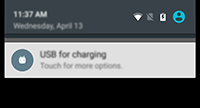
Swipe down from the status bar, touch the USB notification, and touch Charging only.
- If the electrical outlet you’re using is controlled with a switch, check that it is turned on.
- Use the charger that came with the phone.
- Reboot the phone by holding the Power button for 7-10 seconds.
- If the battery has been completely depleted, connect the charger and wait about 10 minutes until it has enough voltage to charge, then press the Power button.
- Make sure the USB plug fits securely into the phone, and inspect the charger for damage to the wire or plug. If you see damage, try another cord.
- Check the wall outlet for damage or loose parts. If you see damage, try another outlet.
- Reset the phone.