Video chat and recording
Your phone's camera uses facial recognition, tracking, and zoom to keep you centered in the view; for example, if you lean back in your chair or stand up. Because the camera works well in any lighting condition, you always look your best in video calls, streaming, and video recordings.
Start video chat
- On your phone, open the Ready For quick tile.
- Connect phone to an external display with a USB-C or HDMI cable.
- Select the Video chat experience.
- Use your phone as a trackpad or a Bluetooth mouse to select the video call app you want to use. To use a different video app, install it on your phone.
- Use your video app to start or join a video call.
 to change the location of the side bar, or
  for other ways to access the side bar.
Record a video with Subject tracking
With Subject tracking, Ready For keeps you front and center so you can free your hands to focus on creating video content.
- On your phone, open the Ready For quick tile.
- Connect phone to an external display with a USB-C or HDMI cable.
- Select the Mobile desktop experience.
- Use your phone as a trackpad or a Bluetooth mouse to click
 then open the Camera app.
 - Click
 in the taskbar, then turn on Subject tracking.
 - Start recording.
Use Ready For dock
For the best video experience, connect your phone to the Ready For dock (available here).
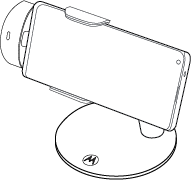
You can remove the fan-cooled phone holder from the Ready For dock stand and attach it to a third-party tripod.
Most external displays with USB-C or HDMI ports charge your phone while in the dock. If your external display’s USB-C ports don’t output power (uncommon), connect the display to a powered USB-C hub, then connect the hub with the dock.
If your external display’s HDMI ports don’t output power (uncommon), connect the display to a USB-C to HDMI adapter that has pass-through power, such as this Lenovo adapter, then use a USB-C cable to connect the adapter with the dock.