Controls

Your Gamepad is fully connected, and you have full access and control when your phone snaps into the Gamepad.

Front controls

Button functions are defined by the game you choose to play.

  1. LEDs turn on while you press the joystick, directional pad, or action buttons. To turn the LEDs off and on, press Home + X buttons.
  2. Left shoulder button (L1)
  3. Left joystick. Push/pull to move objects. Press to select objects.
  4. Directional pad. Press to move up, down, left, or right.
  5. Press to return to phone's home screen.
  6. Right shoulder button (R1)
  7. Right joystick
  8. Action buttons (X, Y, A, and B). Press to perform various actions.
  9. Start
  10. Select

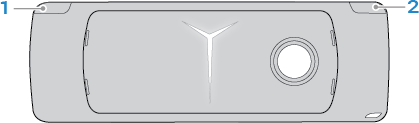
Back controls

  1. Right trigger/button (RT)
  2. Left trigger/button (LT)