Charge
Connect charger
To charge, connect your Gamepad to a power outlet with the USB-C cable.

If the phone is attached, the charger fully charges the phone first, then charges the Gamepad. The Y-lamp on the back of Gamepad indicates that your phone is charging.
Check charge level
When you connect a charger, with no phone attached, the LEDs indicate the Gamepad charge level. A solid light turns on for each completed charge level and a light blinks for the current charge level.
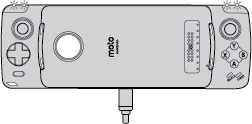
| Lights on | Meaning |
|---|---|
| 1 | 0-24% charged |
| 2 | 25-49% charged |
| 3 | 50-74% charged |
| 4 | 75-100% charged |
Without a charger connected, view the Gamepad charge level at Settings > Moto Mods.