Charge speaker
Charge
Use the charger provided with your phone to charge your speaker.
Don’t use other chargers with a USB-C connector, which can slow charge speed, and avoid incompatible USB-B (micro USB) chargers and uncertified adapters and cables.
To charge, do one of the following:
For fastest charge, connect your speaker to a power outlet with a USB-C cable.
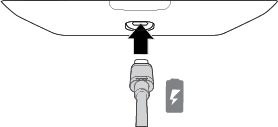
- To charge the phone and the speaker simultaneously, attach speaker to your phone, then connect your TurboPower charger to either the phone or speaker.
Notes:
- Place your speaker on a table to use it as a charging dock for your phone.
- Your phone and speaker will continue to charge if you turn your phone off.
- The speaker’s battery does not charge your phone, but does use your phone’s battery when its battery is depleted.
Check charge level
Press the battery check button to check the charge level.
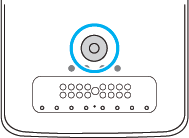
The LEDs indicate the charge level.
| Lights on | Meaning |
|---|---|
| 1 | 0-24% charged |
| 2 | 25-49% charged |
| 3 | 50-74% charged |
| 4 | 75-100% charged |