Charge speaker
For the fastest charge, keep the speaker attached to your phone and charge both at the same time by plugging your charger into the phone’s USB port.
You can also charge the speaker when it's detached from your phone. Plug your charger into the speaker’s charging port.
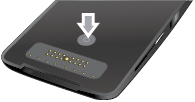
To see how much charge the speaker has:
- Detach it from your phone.
Press and release status button, then look at status light:
If the speaker is not charging:
| Status light | Meaning |
|---|---|
| Rapid blinking green | Full charge |
| Steady green, then off | 51-99% charged |
| Steady amber, then off | 16-50% charged |
| Steady red, then off | 6-15% charged |
| Rapid blinking red | Low charge |
If the speaker is charging:
| Status light | Meaning |
|---|---|
| Steady green | Full charge |
| Slow blinking green | Charging |