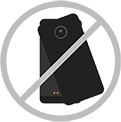
Attach or detach battery
Attach battery
The TurboPower Pack is intended to be attached while quickly charging your phone, then removed to use other mods, but you can keep it attached indefinitely too.
- Make sure the connectors are clean and dry. Also, remove any mods or cases covering the back of your phone.
Align the camera lens on the back of your phone with the TurboPower Pack, and then align the sides and bottom of the phone with the TurboPower Pack until they snap together.
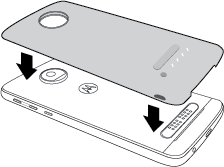
When TurboPower Pack charges your phone you’ll see
 in your phone's status bar.
Detach battery
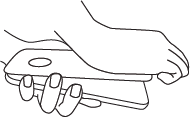
- Rotate your phone so the camera is at the bottom and the screen faces away from you.
Lift the battery’s notch and pull the TurboPower Pack away from the phone.
- When not in use, store your TurboPower Pack in a cool and dry place.
Tip: Don't twist to remove the TurboPower Pack. This might scratch the back of your phone.