Check battery levels
You can check the attached battery’s level by looking in your phone’s quick settings or by using the battery status button.
To check battery level, do one of the following on your phone:
- Swipe the status bar down and open the Moto Mods Manager notification, which is always available near the bottom of your notification list. Touch the notification to view general battery settings.
Open quick settings by swiping down with two fingers. You’ll see two battery icons, attached battery
 and phone battery
  . Touch either battery icon to view more information and settings.
Or, press the battery status button and look at the status lights:
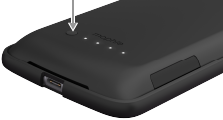
| Lights on | Meaning |
|---|---|
| 0 | 0% charged |
| 1 | 25% charged |
| 2 | 50% charged |
| 3 | 75% charged |
| 4 | 100% charged |
If the battery is charging, a solid light turns on for each completed charge level and a light blinks for the current charge level.
Is it charging my phone?
To see if the attached battery is charging your phone, look at the battery icon in the status bar at the top of your home screen:
| Attached battery charging phone. |
 | Connected charger charging phone. |
 | Attached battery not charging phone’s battery, which is fully charged. |
TipTo make your attached battery last longer, turn on Efficiency mode.