Charge battery
Check remaining battery
- If your screen is dim, touch the screen to wake up the watch.
- Swipe down from the top of the screen to see your remaining battery or the date.
Charge battery
Before using your watch for the first time, charge it for two hours or until the charge indicator shows 100%.
-
Plug the charging cable into a power outlet, then insert the micro USB connector in the charging dock. Always use the cable and wall charger that came with your watch.
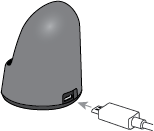
-
Place watch on charging dock. Check that the protective plastic has been removed from back of watch.
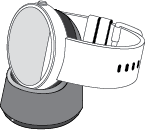
-
When charging, your watch shows a continuous charge level indicator. Your watch is fully charged once the charging indicator light goes off, but it's safe to leave your watch on the Motorola charger after it's fully charged.
Change charging display color
To change the display color while the watch is charging, swipe down on the watch face.
Charging tips
- Use only the Motorola wireless charging dock and power adapter that come with your Moto 360. The Motorola charging system has circuitry that protects the battery from damage from overcharging. Charging with USB data cable connected to a computer or dual part wall charger, or using a different wireless charging dock is not recommended.
- When charging a battery that is completely dead, only the white charging indicator will be on until the watch has enough power to turn on the screen, which should take approximately 10 minutes.
- The Moto 360 battery is not replaceable and should only be removed by a Motorola approved service center or a recycler. Do not attempt to open the watch.
global-en-us-en-us-0000-51 2016-02-09T20:59:16