About your home screen
You see the home screen when you turn on and unlock your phone or swipe up from the bottom of the screen.
Swipe right or left to move between home screens.
What’s on the screen
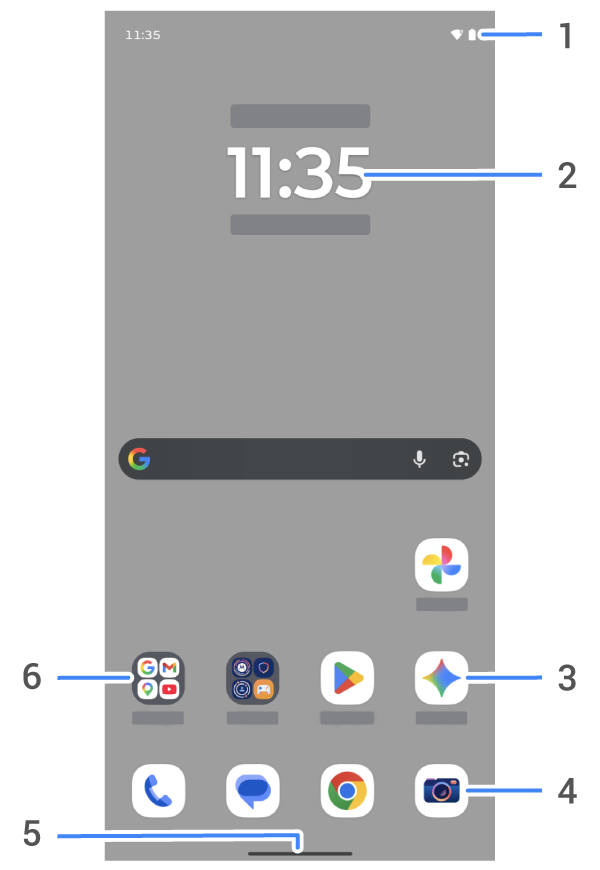
- Status bar: Displays the time and icons that tell you about your phone's battery and network connections. Swipe down to see your notifications and quick settings and to turn your phone off

- Widget: You can add widgets to your home screen for quick access to information or frequent tasks.
- Shortcut: You can add shortcuts to open apps or web pages you use frequently.
- Favorites tray: Provides one touch access to your most-used apps from any home screen page. You can customize which apps appear here.
- Navigation bar: Use gestures to move between apps and screens. You can use gestures but hide the bar. Or, you can replace the bar with the


- Folder: Add folders to organize app shortcuts.
Add/remove screens
You can add more home screens to the right. To add a page, drag an app shortcut or widget to the edge of an existing page and place it on the new screen.
To remove a home screen, drag all apps, shortcuts, widgets, and folders off the screen. After you remove the last item, the home screen will be removed.
Customize your home screen
Organize it:
- Touch & hold an item you want to move, then drag it to the new location.
- Group icons into folders.
- Choose where to find your list of all apps: in the app tray or directly on the home screen.
Change how you get around: You can replace the navigation bar with the
Change how it looks:
- To see options for customizing wallpaper, widgets, and other home settings, touch & hold a blank space on the home screen.
- For an entirely new look and feel for your home screen, you can install a different launcher.