Use edge action bar
Move between apps and screens
Use these gestures to move between screens and apps with the action bar.
| Gesture | Result |
|---|---|
| Swipe down | See notifications |
| Swipe down twice | See quick settings |
| Swipe up | See recent apps |
| Swipe up twice | Open list of all apps |
| Touch twice quickly | Switch to previous app or turn on/off Edge display, depending on your settings. |
If the gestures aren't working, check that Edge touch is turned on in settings.
Swipe in for shortcuts
Swipe in from the action bar to see shortcuts for opening apps, actions, tools, and contacts.
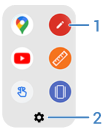
- Open the app or contact
- Customize these shortcuts - replace, delete, or rearrange