Insert or remove SIM card
Your phone might support using an eSIM (embedded SIM card), in addition to any physical SIM card(s). Contact your carrier for details.
Set up eSIM
If your carrier provided instructions to activate an eSIM, follow their instructions.
To activate the eSIM yourself:
- If you don't have a network connection, connect to Wi-Fi.
- Go to Settings > Network & internet > SIMs & mobile network.
Tap Download new SIM to get and set up the eSIM, then follow onscreen instructions.
If you don't see this option, contact your carrier to confirm if your phone supports eSIMs and to get activation instructions.
Insert or remove physical card
- Close the phone and turn it face down.
Insert the SIM tool into the tray hole and gently push to pop it out.
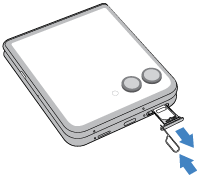
Insert or remove the cards as needed.
To use one SIM card:

If you're using two SIM cards, turn the tray over and insert (gold contacts up) the second card.

To see if your phone supports two phsyical SIM cards, go to Settings > About phone > Device details. If you see SIM status (sim slot 1) and SIM status (sim slot 2), then you can use two physical SIMs.
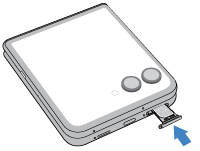
Push the tray back into the phone.
Erase eSIM
You may need to erase your eSIM:
- When you transfer the eSIM number to another phone
- If you're giving the phone to someone else or trading it in
When you erase an eSIM, you remove the following capabilities from the phone:
- Calling
- Mobile data usage
- Messaging
Erasing the eSIM does not cancel your mobile data services. To cancel your services, contact your carrier.
To erase an eSIM:
- Go to Settings > System > Reset options.
- Tap Erase eSIMs > Erase.
To restore an eSIM you erased, contact your carrier.
Fix an issue
If you’re having problems, try these troubleshooting steps.