About your hardware
Hardware diagram
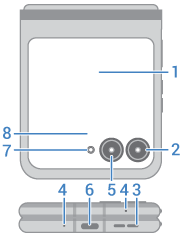
- External display
- Ultra-wide and macro camera (learn more in Camera help)
- Speaker
- Microphone
- Main camera
- USB-C port to charge phone, transfer files, share data connection with tethered devices, and use wired headphones
- Flash
- Proximity sensor
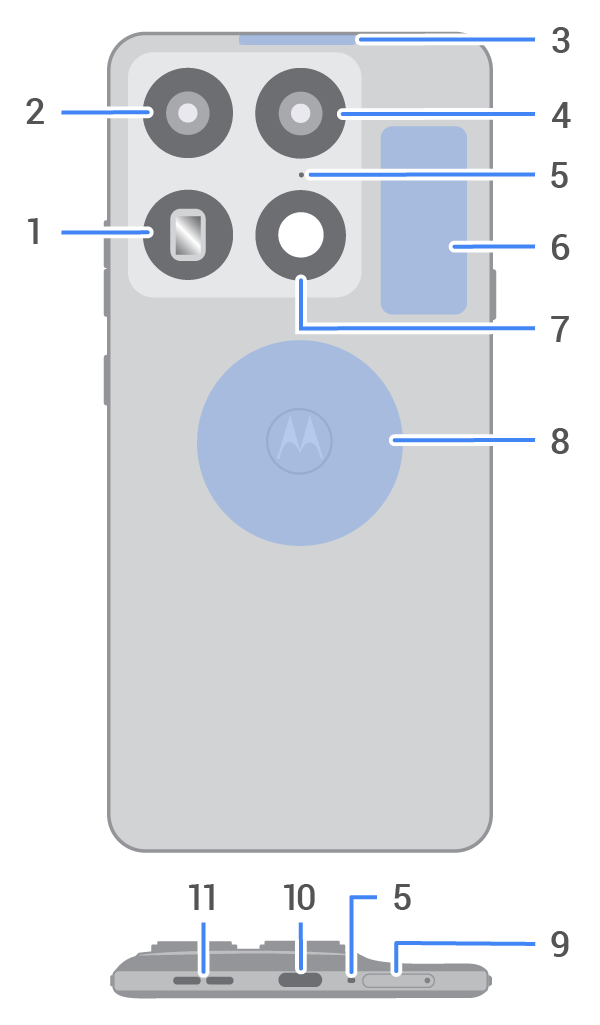
- Back camera
- LED flash
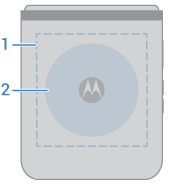
- NFC sensor area for scanning tags or paying with your phone
- Wireless charging area
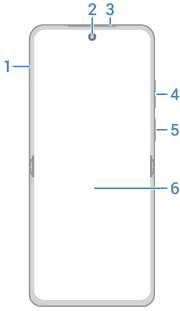
- Tray for physical SIM card
- Front camera
- Earpiece/speaker
- Volume up/down button
- Power button and fingerprint sensor
- Main screen
Important: This product contains magnets. Always keep products with magnets more than 20 cm. (8 in.) from medical devices, such as pacemakers, internal cardio defibrillators, or other devices that can be affected by a magnetic field. Also, keep away from credit cards, ID cards and other media that use magnetically encoded information.
About your screen protector
Don't use third-party screen protectors. Your phone comes with a Motorola-developed screen protector customized to Razr's unique foldable design. The Motorola screen protector is of superior quality and preserves the predicted service life of your phone. In contrast, using third-party screen protectors may reduce your phone's screen sensitivity, cause the main screen to become unresponsive, damage the screen, or cause other touch screen problems. In such cases, Motorola reserves the right to evaluate the situation and decide whether to provide you with free-of-charge warranty service during the remaining warranty period.
Contact an authorized Motorola service center if your screen protector has air bubbles, warps, or separates from the main screen during use. We may replace the screen protector because a compromised screen protector can damage the main screen and shorten the service life of the phone.
If damaged, the screen protector on your phone can be replaced by suitably competent individuals following Motorola-approved repair and service manuals, or by Motorola-approved service personnel. Motorola recommends that the screen protector is replaced by a Motorola-approved service personnel in order to avoid screen damaging and warranty voidance.
Protect your phone
Find cases and other accessories designed for your phone at motorola.com
Care for your phone
Take care not to physically damage your phone. Don't puncture or apply excessive force to the main screen with a hard or sharp object while carrying your phone. Before closing the phone, always ensure that there are no obstructions between the screens or hinges. Items such as cards, coins, keys, and other objects can damage your screen or prevent your phone hinge from closing properly. Don't use excessive force to press the middle area of the screen. Avoid exposing your phone to water, coffee, or other liquids. Also, don't expose your phone to tiny pieces of debris, such as grit.
To clean the screen:
- While this does not disinfect your phone, the best way to keep your phone clean is to wipe it thoroughly with a dry soft cloth. Avoid abrasive cloths, including paper towels and other materials with rough surfaces.
- If the screen gets drops of liquid on it, wipe it with a clean, dry cloth.
To disinfect your phone:
- It is okay to use wipes or cloths moistened with 70% isopropyl alcohol to gently wipe your screen.
- When disinfecting or cleaning your phone, turn it off and avoid getting any moisture in its openings, including the charging port, headphone jack, microphones and speakers.
- Don't submerge your phone in any cleaning agents, avoid using any cleaners with bleach or abrasives, and avoid spraying cleaners directly on the screen.
Other tips:
- Don't submerge your phone in water or other liquids. When you're near water, consider using a Bluetooth speaker to listen music from your phone while keeping it safe.
- Hold your phone firmly when using gestures to open the camera or turn the flashlight on/off.
Dust and water resistance
Water-resistant design creates a barrier to help protect against moderate exposure to fresh water such as accidental spills, splashes or light rain. Not designed to be submerged in water, or exposed to pressurized water, or other liquids; may diminish over time. Designed to provide limited dust protection (>1.0mm). However, ingress of dust is not totally prevented. Not waterproof.
While this device has been designed to provide some dust resistance, exposure to dust should be avoided as dust will reduce the hinge life and could damage the display.
Liquid damage is not covered by your warranty.
To prevent water damage to your phone:
- Do not expose your phone to pressurized water, salt water or liquids other than fresh water
- Dry your phone and ports thoroughly with a soft, clean cloth
- Don’t try to charge your phone when it’s wet
- Don't drop, puncture, or scratch your phone, as this could damage the water repellent features
About Snapdragon Sound technology
Your phone features Qualcomm Snapdragon Sound technology for a premium audio experience.

Qualcomm Snapdragon Sound is a product of Qualcomm Technologies, Inc. and/or its subsidiaries. Qualcomm, Snapdragon and Snapdragon Sound are trademarks or registered trademarks of Qualcomm Incorporated.