About your hardware
Hardware diagram
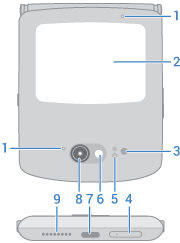
- Microphone
- External display
- Proximity and ambient light sensor
- Tray for physical SIM card
- Time-of-flight sensor for measuring distance to improve photos
- LED flash
- USB-C port to charge phone, transfer files, share data connection with tethered devices, and use wired headphones
- Camera (Learn more in Camera help.)
- Speaker
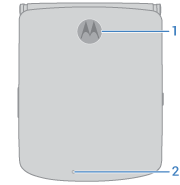
- Fingerprint sensor
- Microphone
- NFC touchpoint for sharing content or paying with your phone
- Wireless charging area
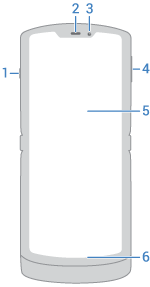
- Power button
- Earpiece
- Selfie camera
- Volume up/down button
- Main screen
- Microphone
Care for your phone
Take care not to physically damage your phone. Don't puncture or apply excessive force to the main screen with a hard or sharp object while carrying your phone. Before closing the phone, always ensure that there are no obstructions between the screens or hinges. Items such as cards, coins, keys, and other objects can damage your screen or prevent your phone hinge from closing properly. Don't use excessive force to press the middle area of the screen. Avoid exposing your phone to water, coffee, or other liquids. Also, don't expose your phone to tiny pieces of debris, such as grit.
To clean the screen:
- While this does not disinfect your phone, the best way to keep your phone clean is to wipe it thoroughly with a dry soft cloth. Avoid abrasive cloths, including paper towels and other materials with rough surfaces.
- If the screen gets drops of liquid on it, wipe it with a clean, dry cloth.
To disinfect your phone:
- It is okay to use wipes or cloths moistened with 70% isopropyl alcohol or Clorox® Disinfecting Wipes to gently wipe your screen.
- When disinfecting or cleaning your phone, turn it off and avoid getting any moisture in its openings, including the charging port, headphone jack, microphones and speakers.
- Don't submerge your phone in any cleaning agents, avoid using any cleaners with bleach or abrasives, and avoid spraying cleaners directly on the screen.
Other tips:
- Don't submerge your phone in water or other liquids. When you're near water, consider using a Bluetooth speaker to listen music from your phone while keeping it safe.
- Hold your phone firmly when using gestures to open the camera or turn the flashlight on/off.
Prevent water damage
Your phone is water and splash resistant, but not completely waterproof. Avoid exposing your phone to water or any other liquids, and do not intentionally submerge it in any liquid. Water and splash resistance are not permanent, and the protection performance may continue to decline due to daily use.
Liquid damage is not covered by your warranty.
To prevent water damage to your phone:
- Do not expose your phone to pressurized water, salt water or liquids other than fresh water
- Dry your phone and ports thoroughly with a soft, clean cloth
- Don’t try to charge your phone when it’s wet
- Don't drop, puncture, or scratch your phone, as this could damage the water repellent features