Use quick settings
Open quick settings
Settings you adjust frequently, like Bluetooth, are “quick settings”, easy to get to from any screen.
To see your first few quick settings, swipe down once from the top of the screen. This works both when the phone is closed (on the external display) and when the phone is open (on the home screen).
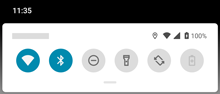
If the phone is open, swipe down again to see all quick settings. (If the phone is closed, the external display only includes the first six settings and you can't swipe again for more.)
Adjust quick settings
To adjust screen brightness, slide  .
.
To adjust other settings:
- Touch an icon to toggle the setting on
 or off
  .
. - Touch & hold an icon to adjust related settings.
| Icon | Setting |
|---|---|
 | Wi-Fi |
 | Bluetooth |
 | Do Not Disturb |
 | Auto-rotate |
 | Flashlight |
 | Audio effects (You can add this to quick settings.) |
 | Battery Saver |
 | Mobile data |
 | Airplane mode |
 | Cast |
 | Data Saver (Appears after you turn on Data Saver the first time.) |
 | Night Light (Appears after you turn on Night Light the first time.) |
 | Bedtime mode (Appears after you turn on Bedtime mode the first time.) |
 | Wi-Fi hotspot (Appears after you turn on hotspot the first time.) |
Open all settings
To open the full list of all settings:
- Open quick settings and touch
 .
. - Or, open the
 Settings app.
 at the top of the app and type your search term.
Customize quick settings
You can rearrange quick settings, putting your most used at the top. You can also add or remove them.
- Open quick settings.
- Touch
 .
. -
Drag to add, remove, or rearrange.
TipIf you’re rearranging, know that only the first six settings show on the external display.
To return quick settings to its original state, touch  > Reset.