Insert and remove SIM and SD cards
Insert or replace cards
CautionMake sure you use the correct size SIM card, don't cut the SIM card and don't use adapters with your SIM card.
- If you are removing an SD card, unmount it first (Settings > Storage).
Insert the tool into the hole in the tray and gently push to pop it out.
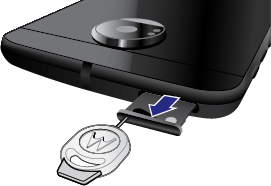
Insert or remove the cards as needed.
To use an SD card and a SIM card:
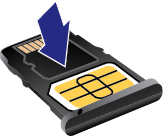
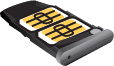
Or, to use two SIM cards (dual-SIM models only):
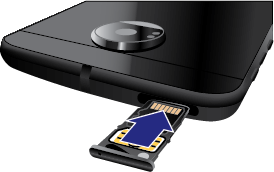
Push the tray back into the phone.
NoteIf you need to activate a SIM, contact your carrier.
Fix a problem
Select a problem to see troubleshooting steps.
- SIM card
- SD card
- Phone doesn't recognise card