Insert or remove SIM card
Replace SIM card
Insert the SIM tool into the tray hole and gently push to pop it out.
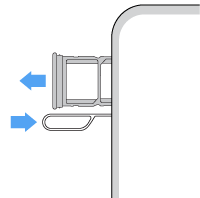
-
To use one SIM card:
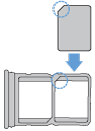
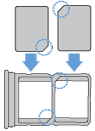
Or, to use two physical SIM cards (not available on all models):
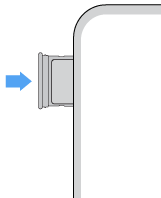
Push the tray back into the phone.
If you inserted two SIMs, you'll receive a notification to set them up. Swipe the notification down and tap it to manage dual SIMs. If you see 
NoteIf you need to activate or resize a SIM, contact your carrier.
Fix an issue
If you’re having problems, try these troubleshooting steps.