Insert and remove SIM and SD cards
Insert or replace cards
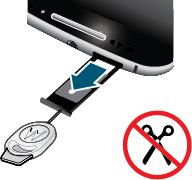
CautionMake sure you use the correct size SIM card, don't cut the SIM card and don't use adapters with your SIM card.
- If you want to remove the SD card, eject it first.
Insert the tool into the hole in the tray and gently push to pop it out.
To insert a SIM card, put it into the tray with the gold contacts facing up; if you are using a single SIM, put it in the SIM 1 position. To put in a memory card, turn the tray over.
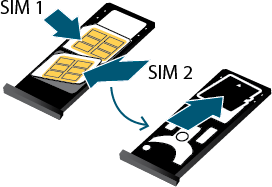
To remove a SIM card, turn the tray over, insert the tool into the hole behind the card and push gently to pop out the card (remove SD card to expose hole).
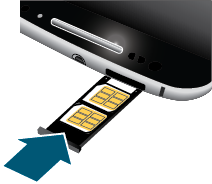
Push the tray back into the phone.
- If you inserted an SD card, format it now.
When two SIMs are inserted, you see  at the top of the Home screen. If you see
  , troubleshoot the issue.
NoteIf you need to activate a SIM, contact your carrier.
Fix an issue
Select an issue to see troubleshooting steps.