Set up sidebar for easy multitasking
Use the sidebar to open favorite apps and features in small, freeform windows that you can move and resize. Or, open them in full screen.
Turn on the sidebar
Go to Settings > Gestures.
Tap Sidebar and turn Use sidebar on

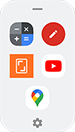
You'll see a sidebar on the right edge of your screen. Swipe it in to see a menu of apps that you can open.

Customize the sidebar
Change apps in sidebar
On the sidebar, tap

Or, go to Settings > Gestures > Sidebar >
Customize the menu:
- To rearrange apps, touch & hold an app, then drag it.
- To remove an app, tap

- To add an app, tap it or mark its checkbox.
- Tap
Change how apps open
For easy multitasking, set apps to open in resizable freeform windows you can drag around the screen, or set them to open in full screen.
On the sidebar, tap
Or, go to Settings > Gestures > Sidebar >
- Tap
- Select whether to open them In freeform or In full screen.
When you're using apps:
- To see an app in a different mode (freeform or full screen), drag it from the sidebar to the center of the screen.
- To see an app in split screen, drag it to the top or bottom of the screen.