What's new in Android 12?
After upgrading, you'll see the following improvements to the Android operating system and other apps.
Better personalisation
Android 12 rethinks the entire user interface, from shapes, light and motion, to customisable system colours that adapt to match you. Redesigned to be more spacious and comfortable, it's the most expressive, dynamic and personal Android ever. It prioritises simplicity while allowing you to reflect your style:
- Change theme, icons and wallpapers from the Personalise menu. Just press and hold a blank space on the Home screen.
- Now, when you change the wallpaper, your entire phone experience changes to match. Your notifications, settings, widgets and even selected apps will match the wallpaper, thanks to Android's advanced colour extraction algorithms.
More ways to stay safe
Privacy dashboard
You can now see which apps have accessed your location, camera or mic over the last 24 hours. Go to Settings > Privacy > Privacy dashboard. If you see anything that concerns you, adjust permissions from the dashboard.
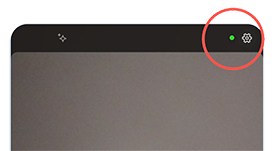
Easily see when apps are using your microphone or camera
Check the status bar to see when an app is using your microphone or camera. Learn more.
Other improvements
Stay in touch
A new conversation widget puts the messages you care about centre stage on your Home screen so you never miss an important chat. You can even see missed calls, birthdays and more at a glance. Add the widget and check it out!
Enhanced gaming
Spend less time waiting and more time playing. Android 12 lets you play as you download, so you can jump straight into gameplay before the full download finishes.
Accessibility improvements
- Area magnification: a new window magnifier lets you zoom in on part of the screen without losing context from the rest of the screen. Learn more.
- Extra dim: Make your display extra dim for night-time scrolling or situations when even the lowest brightness setting is too bright. Learn more.
- Bold text: See text more clearly by switching the font to bold across the whole phone. Learn more.
- Greyscale: Change all colours to greyscale. Learn more.