Control data usage
Sometimes it's easy to exceed the limits of your data plan without realising it. But there's a way to avoid surprises. You can set up usage warnings so you know when you're close and set up hard limits that turn off mobile data so you don't go over your limit. Some apps transfer data in the background, when you're not using them; you can restrict background usage for these data-intensive apps.
Set a usage warning and usage limit
Go to Settings > Data usage.
TipOr, swipe the status bar down with two fingers and touch your mobile operator's name.To set the warning level, drag the right-hand side of the orange warning bar up/down.
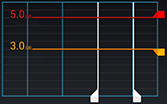
When your data usage reaches the specified level, you'll receive a notification.
To set the usage limit, select Set mobile data limit. Then drag the right side of the red limit bar up/down.
When your data usage reaches the specified level, your phone will turn off data usage.
Restrict background data usage by app
- Go to Settings > Data usage.
- Scroll down to see which apps are transferring data over the mobile network.
- Touch an app, then touch
 > Restrict background data.

Restrict all background data usage
- Go to Settings > Data usage.
- Touch > Restrict background data.