Preview notifications when screen sleeps
When your screen sleeps, battery-friendly Active display notifications fade in and out, lighting only the pixels needed and showing notifications delivered since you last woke your screen. You can select the type of notifications to be shown, set them to be shown or not during the night and limit content to control your privacy.
Active display does not show notifications:
- At night, during hours you specify
- When the phone is in your pocket or purse
- When the phone is lying face down
- When you are on a call

Respond to Active display notifications
From the lock screen, you can:
- Preview a notification. Touch and hold its icon.
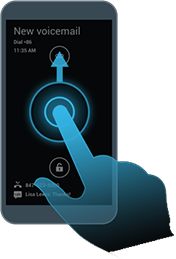
Go directly to a notification. Drag your finger up to the target (then enter a PIN or password if using a screen lock).
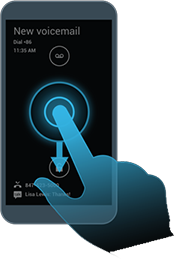
View all notifications. Drag your finger down (then enter a PIN or password if using a screen lock).
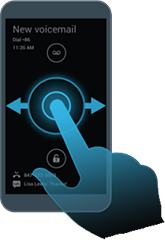
Stop notifications from flashing until the next one is delivered. Drag your finger to the right or left edge of the screen.
Change Active display settings or turn it off
- Go to Settings > Active display.
Do any of the following:
- To turn off Active display, deselect the box.
- To select the types of notifications sent, touch Select apps.
- To control privacy by hiding notification details when the screen is locked, touch More privacy.
- To adjust the hours notification delivery is off, next to Sleep at night, touch
 . If you want notifications to be delivered during night hours, deselect the box.