Analyse battery use
Want specifics on your battery's level and what's using it most? You can get detailed information about what level of charge your battery has, how long since your last charge and recommendations on how to adjust your settings to maximise battery life.
To review battery use and adjust settings:
Go to Settings > Battery.
- You'll see a list of items using battery power. Touch an item to see detailed information about its usage and, where applicable, adjust settings to reduce its usage.
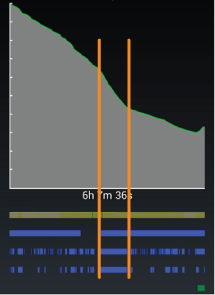
Touch the battery history graph to see more details about how power-intensive activities are using the battery. For example, the following graph shows that an extended period of heavy use, with the screen on continuously, discharged the battery faster than normal.
If your battery history shows steep declines, check the following:
>Mobile network signal - As the network signal gets weaker, the phone uses up to three times more battery power than normal to maintain the network connection. Colours indicate the signal strength:
Green Great signal Grey Good signal Gold Moderate to poor signal Yellow No signal Red Scanning for network Black Not using mobile network If the signal strength is poor or worse, move to a location with a better network signal or use Wi-Fi for data.
TipA weak network signal can also cause static on calls, one way calls, dropped calls, connectivity and data issues, slow performance and other issues. Even if your geographic area has good network coverage, building walls, underground locations, dead spots in coverage and other environmental factors can impede the signal. In these cases, move near a window or use Wi-Fi.- GPS - Blue indicates that GPS was on. When possible, charge your phone while using GPS.
- Wi‑Fi - Blue indicates that Wi-Fi was on, but not necessarily connected with a Wi-Fi network. When possible, use Wi-Fi for data.
- Awake - Blue indicates that an app was preventing the phone from going into sleep mode when idle, usually to complete some task. However, some user-installed apps can drain the battery by keeping the phone in awake mode longer than necessary.
- Screen ON - Blue indicates that the screen was on. If this is draining your battery, decrease the screen timeout (inactivity before your phone sleeps) to 1 minute or less, set screen brightness to automatic, limit live wallpapers and press the Power button to turn off the screen when not needed. Consider charging your phone during heavy use, particularly when using games or apps that use frequent background data.
- Charging - Green indicates that the phone was charging.