About your home screen
You see the home screen when you turn on and unlock your phone or touch  .
.
Your home screen extends beyond the initial screen. Swipe right or left to see additional pages.
Here are the parts of your home screen:
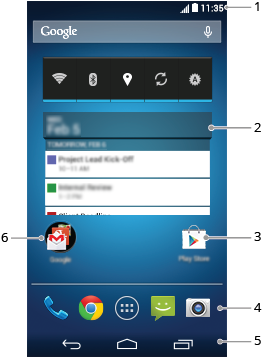
- Status bar: Displays the time and icons that tell you about your phone's battery and network connections. Swipe down to get to your settings and handy toggle switches.
- Widget: You can add widgets to your home screen for quick access to information or frequent tasks.
- Shortcut: Opens an app or a web page. You can add shortcuts to apps you use frequently, instead of opening and scrolling through your list of all apps.
- Favourites tray: Provides one-touch access to your most-used apps from any of the home screen pages. To open the list of all your apps, touch
 .
. - Navigation:
 takes you back one screen. returns you to the home screen from any app.
  lets you switch between recent apps.
 - Folder: Add folders to organise app shortcuts.