Google Now delivers customised cards, based on information from your Google services (locations, searches, web history, Gmails, and calendar events) and from third-party products that you allow Google to access.
For example, get traffic reports before leaving for a dentist appointment or train arrival times while waiting at the station. View your team's scores on gamedays, or find popular restaurants when you travel.
Start using Google Now
- Set up your Google account (if not already done). Drag the status bar down and touch
 Settings > Settings > ACCOUNTS. You must use a Google account for Google Now to work.
 Swipe up from the navigation bar at the bottom of any screen, or touch the Google search bar on the home screen.
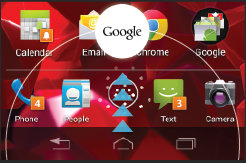
- Follow the on-screen instructions.
- Enable location services when prompted; you can also enable them later in your settings.
- Touch Yes, I'm in.
To see the available cards and their default settings, touch
 > Sample cards.
Over time, Google Now will start delivering your customised notifications and cards.
View cards
- Swipe up from the navigation bar at the bottom of any screen.
Or touch the Google search bar on the home screen.

- When a card has a new update, you’ll receive a notification. You can pull down the notifications shade to open the card or dismiss the notification.
For some cards, you can touch the card for more details or to take action, like check into a restaurant.
When you are finished with a card, swipe it left or right to dismiss it.
Edit card settings or turn off card
To customise or turn off a card:
- Touch > Settings > Google Now, then touch the card you want to edit.
- Adjust the card settings, or turn the card off or on.
Turn Google Now off
Turning off Google Now stops the display of cards and returns Google Now settings to their defaults.
Scroll to the bottom of the Google Now screen and touch
> Settings > Google Now.- Slide the on/off switch to off.
To restart Google Now, slide the on/off switch to on.
More help
To learn more, touch
> Help.
verizon-en-us-en-gb-3207-42