Insert and remove SIM and SD cards
About the SD card
Your phone supports an optional microSD card up to 128 GB.
The type to buy depends on how you'll format the card:
Portable storage (can use card in different devices): A Class 2, 4, or 6 card is sufficient.
Internal storage (card used only by phone): Use a high speed card such as UHS-1 type for best performance. Class 2, 4, or 6 cards are slower than your phone’s internal storage, so using them for internal storage would slow your phone's performance.
Learn more about the differences between portable storage and internal storage.
Remove back cover
Turn the phone upside down with the back facing you.

Insert your fingernail into the notch to the left of the charging port, and pry the cover off. Don’t be afraid to use a little muscle.
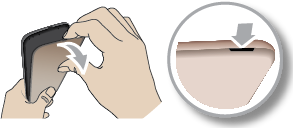
Insert or replace cards
After removing the cover, remove the battery and then insert or remove cards as needed:
Remove the battery.

To insert a SIM, slide it into the SIM slot with gold contacts facing down.
To insert an SD card, slide the SD card into the slot on top of the SIM.

If your phone supports dual SIMs:

When two SIMs are inserted, you see  at the top of the home screen. If you see
  , troubleshoot the issue.
Replace back cover
Insert the battery face up.
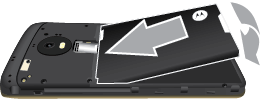
Snap the cover on.

When two SIMs are inserted, you see at the top of the home screen. If you see , troubleshoot the issue.
Fix an issue
Select an issue to see troubleshooting steps.
- SIM card
- SD card
- Phone doesn't recognize card