Use the Command Center widget
Be prepared for what’s ahead with the Command Center widget, your control center for date and time, alarms, weather, and battery status.
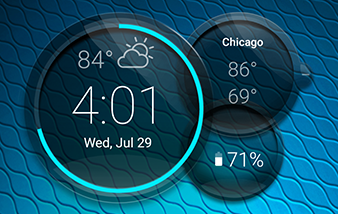
The widget always shows the clock:
- The colored ring around the clock shows your available battery power; touch the ring to change its color.
- To show or hide the other circles, touch
 or
or  .
.
Add widget to home screen
- Touch & hold the home screen.
- Touch WIDGETS.
- Touch & hold the Command Center widget, then drag it to a home screen page.
Set or delete alarms
- Touch the time and date.
Do one of the following:
- To use an existing alarm, switch it on
 . Touch
  to view or edit its ringtone.
 - To add a new alarm, touch and set the time and ringtone.
- To delete an alarm, touch next to it, then touch
 .
.
- To use an existing alarm, switch it on
- To control general alarm settings, like alarm volume and snooze duration, touch
 > Settings.
When an alarm is set,  shows in the widget.
Manage cities for weather forecasts
The widget displays current temperature for your location or for a city you specify.
To display the temperature for your current location:
Do one of the following:
- Touch Add cities.
- Touch
 .
.
Turn Current location on.
To see a forecast, touch the current temperature on the widget.
To add a city:
- To add your first city, touch Add cities or . Or, touch the weather to add more cities.
Touch
and search for a location. Then touch the city to add.TipIf you add multiple cities, switch between them by touching on the forecast.
To remove a city:
- Touch the temperature.
- Touch > Settings.
- Touch
 next to the city's name.
View and manage battery usage
The colored ring around the clock shows your available battery power; touch the ring to change its color.
- Touch to open the battery circle and see exact battery percentage.
- Touch the battery percentage to review your apps' power usage and battery settings.
Adjust battery settings as needed:
- Touch the graph to analyze your battery usage.
- Below the graph, you'll see a list of items using battery power. Touch an item to see detailed information about usage and, where applicable, adjust settings to reduce usage.
- If your battery is very low, switch to Battery Saver mode. Touch > Battery Saver and turn it on.
- To simplify your status bar, uncheck Show battery percentage in status bar.