Use quick settings
Open quick settings
Settings you adjust frequently, like Bluetooth, are ‘quick settings’, easy to get to from any screen.
To see your first few quick settings, swipe down once from the top of your screen.
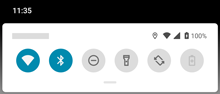
To see all quick settings, swipe down again.
Adjust quick settings
To adjust the screen brightness, slide 
To adjust other settings:
- Tap an icon to toggle the setting on


- Touch & hold an icon to adjust related settings.
Your icons might be square, not round.
| Icon | Setting |
|---|---|
 | Wi-Fi |
 | Bluetooth |
 | Do Not Disturb |
 | Auto-rotate |
 | Torch |
 | Aeroplane mode |
 | Wi-Fi hotspot (Appears after you turn on hotspot the first time). |
 | Quick Share |
 | Battery Saver |
 | Mobile data |
 | Screen cast |
 | Screen record |
 | Data Saver (Appears after you turn on Data Saver for the first time.) |
 | Night light |
 | Colour inversion (Appears after you turn on Colour inversion for the first time.) |
Open all settings
To open the full list of all settings:
- Open quick settings and tap

- Or, open the Settings app

TipSearch the Settings app to find what you need quickly. Just tap 
Customise quick settings
Add, remove, rearrange quick settings
You can rearrange quick settings, putting your most-used at the top. You can also add or remove them.
- Open quick settings.
- Tap

Drag to add, remove or rearrange.
To return quick settings to its original state, tap 
TipYou can also change the background colour to be light or dark.